
Hindi InScript Keyboard Layout: Complete Guide with Examples and Typing Practice
InScript is particularly useful for students, government job aspirants, office employees and anyone who regularly works with Hindi documents. Once you understand the positions of vowels, consonants, matras and special characters, you can develop a consistent Hindi typing technique without memorising a separate key for every possible word.
Many beginners find the layout confusing because the physical keyboard shows English letters while the selected Hindi input method produces Devanagari characters. However, the arrangement follows a systematic structure. Vowels and their signs occupy one part of the keyboard, while consonants are arranged in another part.
In this guide, you will learn the Hindi InScript keyboard layout, normal and Shift key combinations, consonant and vowel mappings, matra typing, conjunct characters, Windows setup instructions and practical exercises.
What Is the Hindi InScript Keyboard Layout?
InScript stands for Indian Script. It is a standardised keyboard layout designed for entering Indian-language characters using a conventional computer keyboard.
It uses a standard QWERTY-style keyboard arrangement, generally with 101 physical keys. Instead of entering English letters, the selected InScript input method maps physical keyboard keys to characters from the relevant Indian script.
The layout is designed around the structure of Indian scripts, including vowels, consonants, vowel signs and other commonly used characters.
One important characteristic is that vowels are generally placed on the left side of the keyboard, while consonants are arranged towards the right. The arrangement is intended to provide a systematic approach to Indian-language typing.
The Government of India notified the Enhanced InScript Keyboard Layout Standard, IS 16350:2016, for use in e-governance systems in October 2016. The standard was published by the Bureau of Indian Standards.
Why Is InScript Used for Hindi Typing?
The InScript layout offers several advantages:
- Standardised arrangement: It provides a defined mapping between physical keyboard keys and Devanagari characters.
- Direct character input: You can enter Hindi consonants, vowels and signs directly.
- Unicode compatibility: Compatible InScript input methods generate Unicode Devanagari text.
- Consistent learning: Once you learn the layout, you can practise character positions instead of depending on word suggestions.
- Multilingual support: InScript layouts are available for multiple Indian languages, with language-specific character mappings.
Hindi InScript Keyboard Layout Chart
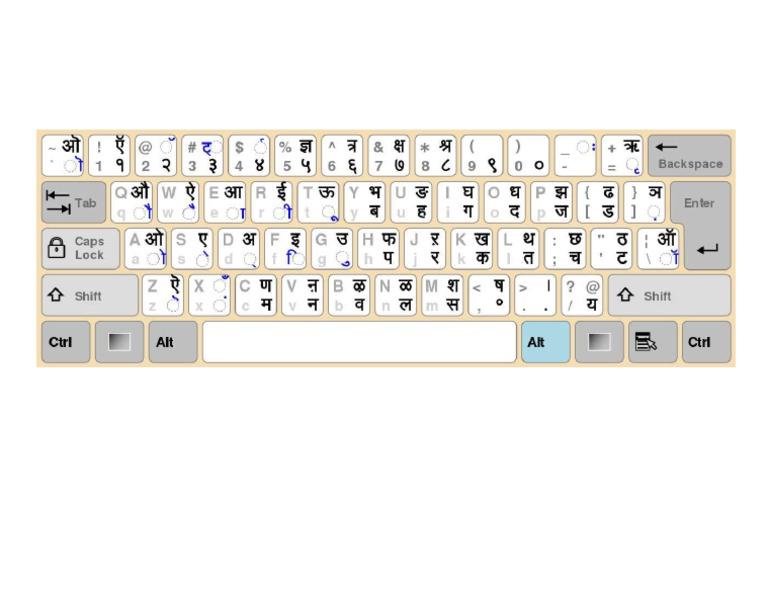
The keyboard chart is the most important reference for learning InScript typing.
Before starting practice, understand that each English key on your keyboard can produce a different Hindi character depending on whether you press it normally or with Shift.
The following examples use the Windows Devanagari InScript arrangement listed in the Unicode Common Locale Data Repository. Other software or examination-specific versions may use different mappings.
Hindi InScript: Important Key Mapping Chart
Here are some useful key combinations to begin learning.
| English Key | Normal Output | Shift + Key |
|---|---|---|
| Q | ौ | औ |
| W | ै | ऐ |
| E | ा | आ |
| R | ी | ई |
| T | ू | ऊ |
| Y | ब | भ |
| U | ह | ङ |
| I | ग | घ |
| O | द | ध |
| P | ज | झ |
| A | ो | ओ |
| S | े | ए |
| D | ् | अ |
| F | ि | इ |
| G | ु | उ |
| H | प | फ |
| J | र | ऱ |
| K | क | ख |
| L | त | थ |
How to read this table:
- Pressing Q normally produces ौ.
- Pressing Shift + Q produces औ.
- Pressing K normally produces क.
- Pressing Shift + K produces ख.
- Pressing E normally produces ा.
- Pressing Shift + E produces आ.
Understanding Normal Keys and Shift Keys
The InScript keyboard uses different character layers. The normal key produces one character, while pressing Shift with the same key produces another character.
For example:
| Key Combination | Output |
|---|---|
| k | क |
| Shift + k | ख |
| y | ब |
| Shift + y | भ |
| i | ग |
| Shift + i | घ |
| o | द |
| Shift + o | ध |
| p | ज |
| Shift + p | झ |
This arrangement helps organise related Devanagari characters within the same keyboard region.
Practising Shift Combinations
Start with the following pairs:
- क / ख
- ग / घ
- च / छ
- ज / झ
- ट / ठ
- ड / ढ
- त / थ
- द / ध
- प / फ
- ब / भ
For example:
क ख क ख क ख
ग घ ग घ ग घ
त थ त थ त थ
द ध द ध द ध
This exercise helps you develop familiarity with the two character layers.
Why Should You Learn Shift Combinations?
Many Hindi characters are available through Shift combinations rather than separate normal keys.
If you ignore the Shift layer, you will have difficulty typing several aspirated consonants and additional characters.
Regular practice helps you learn which fingers should press the keys and reduces unnecessary movement.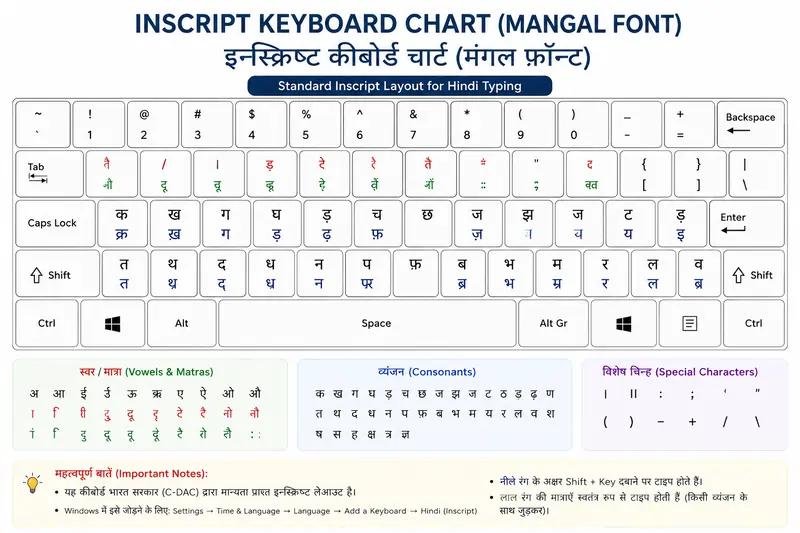
Hindi InScript Vowels and Matras
Vowels and matras are an important part of the InScript keyboard.
Independent vowels and dependent vowel signs are not the same. An independent vowel can appear as a standalone character, while a matra attaches to a consonant.
Here are some commonly used mappings in the Windows InScript arrangement.
Independent Vowels
| English Key Combination | Hindi Output |
|---|---|
| Shift + D | अ |
| Shift + E | आ |
| Shift + F | इ |
| Shift + R | ई |
| Shift + G | उ |
| Shift + T | ऊ |
| Shift + S | ए |
| Shift + W | ऐ |
| Shift + A | ओ |
| Shift + Q | औ |
Dependent Matras
| English Key | Matra |
|---|---|
| E | ा |
| F | ि |
| R | ी |
| G | ु |
| T | ू |
| S | े |
| W | ै |
| A | ो |
| Q | ौ |
The above mapping follows the Windows Devanagari InScript chart.
How to Type Matras with Consonants
A useful way to understand the layout is to practise one consonant with different matras.
For example, the consonant क can be combined with several vowel signs.
| Word Combination | Key Sequence |
|---|---|
| क | K |
| का | K + E |
| कि | K + F |
| की | K + R |
| कु | K + G |
| कू | K + T |
| के | K + S |
| कै | K + W |
| को | K + A |
| कौ | K + Q |
Notice that the consonant is entered first, followed by its dependent vowel sign.
An interesting detail is that the ि sign appears visually to the left of its consonant. However, the consonant is encoded first and the dependent sign follows it in the Unicode sequence.
For example:
- Press K to enter क.
- Press F to enter ि.
- The displayed result becomes कि.
How to Type Hindi Consonants Using InScript
Consonants are called व्यंजन in Hindi. They form the foundation of most Hindi words.
The InScript arrangement places consonants in a systematic order, making it easier to practise related sounds.
Important Consonant Examples
| English Key | Hindi Character | Shift Combination | Shift Output |
|---|---|---|---|
| Y | ब | Shift + Y | भ |
| U | ह | Shift + U | ङ |
| I | ग | Shift + I | घ |
| O | द | Shift + O | ध |
| P | ज | Shift + P | झ |
| H | प | Shift + H | फ |
| J | र | Shift + J | ऱ |
| K | क | Shift + K | ख |
| L | त | Shift + L | थ |
The keyboard chart should always be kept available during the initial practice period.
Practise Consonants in Groups
Start with simple consonant exercises:
क ख ग घ
च छ ज झ
ट ठ ड ढ
त थ द ध
प फ ब भ
Practise each group slowly. Try to press the correct key without looking at the keyboard once you become familiar with the positions.
How to Type Halant and Conjunct Characters
Halant, represented by ्, is used to suppress the inherent vowel of a consonant.
It plays an important role in creating conjunct characters.
For example:
- क + ् + ष = क्ष
- त + ् + र = त्र
- ज + ् + ञ = ज्ञ
- श + ् + र = श्र
For example, a basic conjunct sequence is entered by typing:
क + ् + ष
The shaping engine then displays the appropriate conjunct form when the font and text-rendering system support it.
Common Conjunct Examples
| Combination | Result |
|---|---|
| क् + ष | क्ष |
| त् + र | त्र |
| ज् + ञ | ज्ञ |
| श् + र | श्र |
| द् + ध | द्ध |
| क् + त | क्त |
| न् + द | न्द |
| स् + थ | स्थ |
Not every possible conjunct has a dedicated physical key. Many are formed by entering the relevant consonants and halant in the correct order.
Practise Conjunct Characters
Try typing these combinations:
क्ष, त्र, ज्ञ, श्र, द्ध, क्त, न्द, स्थ
After becoming comfortable with individual combinations, practise complete words:
- शिक्षा
- ज्ञान
- क्षेत्र
- राष्ट्र
- प्रश्न
- संस्कृति
- व्यवस्था
- विद्यालय
How to Type Special Hindi Characters
Besides vowels and consonants, Hindi typing requires several additional signs.
Some commonly used characters include:
| Character | Name | Example |
|---|---|---|
| ं | Anusvara | हिंदी |
| ँ | Chandrabindu | माँ |
| ः | Visarga | दुःख |
| ् | Halant | क् |
| ़ | Nukta | क़, ख़, ग़ |
| । | Danda | भारत। |
The normal and Shift layers of the InScript keyboard include additional signs and characters beyond everyday Hindi letters.
For rare Devanagari characters, extended signs and additional layers, consult the complete keyboard chart corresponding to your actual input method.
Do not assume that every rare character can be entered through the basic QWERTY layer alone.
How to Enable Hindi InScript Keyboard in Windows 11
Windows includes Hindi keyboard input support. You can install Hindi while keeping English as your Windows display language.
Microsoft documents the process through Windows Language and Region settings.
Follow these steps:
Step 1: Open Settings
Press:
Windows + I
This opens the Windows Settings application.
Step 2: Open Language and Region
Navigate to:
Time & Language → Language & Region
Step 3: Add Hindi
Select the option to add a language.
Search for Hindi and choose it from the available languages.
Click Next and complete the installation.
Step 4: Open Hindi Language Options
After installation:
- Find Hindi in the Preferred Languages list.
- Select the three-dot menu.
- Open Language Options.
- Check the installed keyboard options.
Step 5: Select the Hindi Keyboard
Open the keyboard selector from the taskbar or press:
Windows + Spacebar
Select the required Hindi keyboard.
Verify that the active layout is the one you intend to practise. Do not assume that Hindi Phonetic and Hindi Traditional use the same key mapping.
Step 6: Start Typing
Open Notepad or Microsoft Word.
Select the Hindi keyboard and try typing a few characters.
For example, using the Windows Devanagari InScript mapping covered in this guide:
- K produces क.
- Shift + K produces ख.
- E produces ा.
- Shift + E produces आ.
How to Switch Back to English
Press Windows + Spacebar again and select English (US) or the required English keyboard.
You can switch between installed input methods without changing your entire Windows display language.
InScript vs Hindi Phonetic Typing
Both InScript and phonetic typing allow users to enter Hindi text through an English physical keyboard, but their methods are different.
InScript Typing
InScript uses fixed character-to-key mappings.
For example:
- The K key produces क.
- The Shift + K combination produces ख.
Hindi Phonetic Typing
Hindi Phonetic typing uses Roman transliteration.
For example, typing:
namaste
can produce:
नमस्ते
The input method analyses the Roman spelling and provides possible Hindi word suggestions.
Microsoft documents this phonetic suggestion process in its Hindi IME guide.
Difference Between InScript and Phonetic
| Feature | InScript | Hindi Phonetic |
|---|---|---|
| Typing Method | Direct character mapping | Roman transliteration |
| Key Positions | Fixed layout | Based on pronunciation |
| Learning Requirement | Keyboard mapping practice | Roman spelling familiarity |
| Suggestions | Not normally required | Provides word suggestions |
| Suitable For | Direct keyboard typing | Quick everyday Hindi input |
| Examination Use | Where InScript is specified | Only where permitted |
If your examination requires InScript, practising with Hindi Phonetic alone will not prepare you for the required key positions.
Common Mistakes While Learning InScript
Beginners often make mistakes because they try to type quickly before understanding the keyboard.
Here are some common problems.
1. Confusing Normal and Shift Characters
Some keys produce entirely different characters when Shift is pressed.
For example:
- K = क
- Shift + K = ख
2. Learning the Wrong Keyboard Layout
Hindi Traditional, Hindi Phonetic and other Hindi input methods are not identical.
Always check which input method is active before practising.
3. Incorrect Matra Combinations
A small matra mistake can change the spelling of a word.
Practise combinations such as:
का, कि, की, कु, कू, के, कै, को, कौ
4. Forgetting the Halant
The halant is important for creating conjunct consonants.
For example:
क् + ष = क्ष
Without the correct sequence, you may produce an incorrect character combination.
5. Looking at the Keyboard Too Frequently
Beginners often become dependent on looking down at every key.
Start with slow exercises and gradually try to type without looking at the keyboard.
6. Practising Too Many Things Together
Do not begin by typing long paragraphs containing unfamiliar characters.
First practise vowels, then consonants, then matras and finally conjuncts.
Hindi InScript Typing Practice Exercises
The best way to learn InScript is through regular practice.
Start with basic letters and gradually move towards complete words and sentences.
Exercise 1: Basic Vowel Practice
Practise the following independent vowels:
अ आ इ ई उ ऊ ऋ ए ऐ ओ औ
Repeat each character several times.
Then practise the dependent vowel signs:
ा ि ी ु ू ृ े ै ो ौ
Exercise 2: Consonant Practice
Practise these groups:
क ख ग घ
च छ ज झ
ट ठ ड ढ
त थ द ध
प फ ब भ
म न व ल
स श ष ह
Focus on producing the correct character with the corresponding normal or Shift key.
Exercise 3: Matra Combination Practice
Practise these combinations:
का कि की कु कू कृ के कै को कौ
गा गि गी गु गू गृ गे गै गो गौ
पा पि पी पु पू पृ पे पै पो पौ
मा मि मी मु मू मृ मे मै मो मौ
Exercise 4: Word Typing Practice
Try typing these Hindi words:
- भारत
- विद्यालय
- पुस्तक
- किसान
- सरकार
- विद्यार्थी
- संस्कृति
- परीक्षा
- शिक्षा
- समाचार
Exercise 5: Sentence Typing
Practise the following sentences:
- भारत एक विशाल देश है।
- विद्यार्थी नियमित रूप से पढ़ाई करते हैं।
- हमें अपनी भाषा का सम्मान करना चाहिए।
- किसान खेत में मेहनत से काम करता है।
- नियमित अभ्यास से टाइपिंग की गति बढ़ती है।
Exercise 6: Paragraph Typing
Type the following paragraph without looking at the keyboard.
हिंदी टाइपिंग का महत्व
हिंदी भारत की प्रमुख भाषाओं में से एक है। कंप्यूटर पर हिंदी में काम करने के लिए सही कीबोर्ड लेआउट सीखना जरूरी है। इनस्क्रिप्ट कीबोर्ड एक व्यवस्थित तरीका प्रदान करता है, जिससे उपयोगकर्ता देवनागरी अक्षर, स्वर, व्यंजन और मात्राएँ टाइप कर सकते हैं। नियमित अभ्यास से कीबोर्ड की पहचान बेहतर होती है और टाइपिंग में होने वाली गलतियाँ कम होती हैं। इसलिए शुरुआत में सही अक्षरों और कुंजियों का अभ्यास करना चाहिए।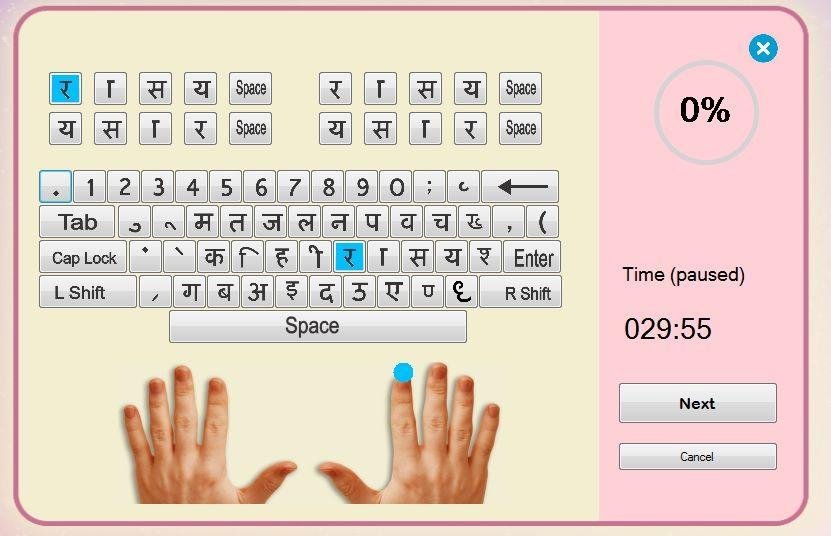
How to Improve Hindi InScript Typing Speed
Learning the keyboard layout is only the first step. You must also develop consistency, accuracy and proper finger movement.
1. Learn the Layout Row by Row
Start with the vowel and consonant positions.
Do not try to memorise the entire keyboard in one sitting.
2. Practise Shift Combinations
Make a separate practice list for normal and Shift characters.
This will help you avoid confusion between related consonants.
3. Practise Matras Daily
Matras appear in almost every Hindi passage.
Spend a few minutes daily typing combinations with different consonants.
4. Focus on Accuracy First
Do not try to achieve a high typing speed immediately.
First develop correct key recognition, then gradually increase your typing speed.
5. Use Timed Typing Tests
Once you become familiar with the layout, start taking timed typing tests.
Track:
- Words per minute.
- Accuracy.
- Correct characters.
- Incorrect characters.
- Frequently mistyped keys.
6. Follow a Daily Practice Routine
| Practice Activity | Time |
|---|---|
| Vowel practice | 5 Minutes |
| Consonant practice | 5 Minutes |
| Shift combinations | 5 Minutes |
| Matra combinations | 5 Minutes |
| Word and sentence practice | 5 Minutes |
| Timed typing test | 5 Minutes |
| Total | 30 Minutes |
Consistency is more important than practising for several hours on only one day.
Practise Hindi InScript Typing Online on TypeHindi
You do not need to rely only on a physical keyboard chart while learning InScript.
TypeHindi provides tools to help you understand Hindi typing and practise character combinations.
You can use the following resources:
Hindi Typing Practice
Practise Hindi words and passages while tracking your speed and accuracy.
https://www.typehindi.in/practice/hindi-typing
Hindi Keyboard Layout
Explore the Hindi keyboard layout to identify character positions and Shift combinations.
https://www.typehindi.in/keyboard-layout/hindi
Hindi Typing Test
Take a timed test to evaluate your Hindi typing performance.
https://www.typehindi.in/test/hindi-typing
Use the keyboard layout reference alongside the practice tool until you become comfortable typing without looking at the chart.
Frequently Asked Questions (FAQs)
1. What is the Hindi InScript keyboard layout?
The Hindi InScript keyboard is a standardised Devanagari input layout that maps Hindi characters to keys on a conventional QWERTY keyboard.
2. Is InScript an official Indian keyboard layout?
Yes. The Government of India notified the Enhanced InScript Keyboard Layout Standard IS 16350:2016 for e-governance systems in October 2016.
3. What is the difference between InScript and Hindi Phonetic?
InScript uses fixed character-to-key mappings, whereas Hindi Phonetic uses Roman transliteration to produce Hindi word suggestions.
4. Is Mangal a keyboard layout?
No. Mangal is a Unicode Devanagari font. InScript is a keyboard layout that determines which characters are entered.
5. How do I enable InScript in Windows 11?
Open Settings, navigate to Time & Language, select Language & Region, add Hindi and check the available keyboard options. Switch between input methods using Windows + Spacebar.
6. What is the shortcut to switch between English and Hindi?
Press Windows + Spacebar to switch between installed keyboard layouts.
7. How do I type ख using InScript?
In the Windows Devanagari InScript mapping used in this guide, press Shift + K.
8. How do I type आ using InScript?
Press Shift + E in the Windows Devanagari InScript mapping used in this guide.
9. How do I type Hindi matras in InScript?
Use the relevant vowel-sign keys after the consonant. For example, K followed by E produces का in the layout described here.
10. How do I type conjunct characters?
Enter the relevant consonants with the halant in between. For example, क + ् + ष produces क्ष when correctly rendered.
11. Is InScript the same as Remington GAIL?
No. These are different Hindi keyboard layouts with different character mappings. Their key positions should not be treated as interchangeable.
12. Can I use InScript for government typing examinations?
It depends on the recruitment examination. Some examinations specify InScript or a modified InScript layout, while others prescribe different arrangements. Always follow the official instructions.
13. Do I need to install a separate Hindi font to use InScript?
Not necessarily. The input method and the font are separate. Your system needs compatible Devanagari text rendering, but the InScript layout itself is responsible for entering the characters.
14. Is InScript difficult to learn?
It may seem unfamiliar initially, but learning the keyboard row by row, practising Shift combinations and typing regular exercises makes it easier.
Final Words
The Hindi InScript keyboard layout provides a systematic way to type Devanagari characters using a standard computer keyboard. Once you understand the normal and Shift key combinations, you can practise vowels, consonants, matras and conjunct characters more confidently.
Start by learning the character positions, then move towards word and sentence exercises. Do not rush to increase your typing speed before you become comfortable with the layout.
If you are preparing for a government typing test, verify the exact layout required by the recruiting organisation. Some examinations may use modified InScript arrangements, so practising the correct version is essential.
Use the Hindi keyboard layout reference and regular online typing tests on TypeHindi to improve your accuracy and develop consistent typing skills.
Prepare & Test Your Speed on TypeHindi
Practice full 10-minute exam simulations for SSC CHSL, High Courts, and state clerical exams with real WPM & accuracy scoring.
Mandated by SSC for Hindi typing tests. Practice with official Unicode InScript layout and realistic passages.
Step-by-step interactive lessons for beginners. Master finger positions on home row, top row, and bottom row.
Interactive visual map of all vowels, consonants, halants, and special conjunct characters in Devanagari script.
Build muscle memory and reflex speed while destroying falling words in Hindi and English.
Interactive steno stroke teacher, vector animated demonstrations, word builder, and 40–120 WPM audio dictations.
Related Articles & Typing Guides
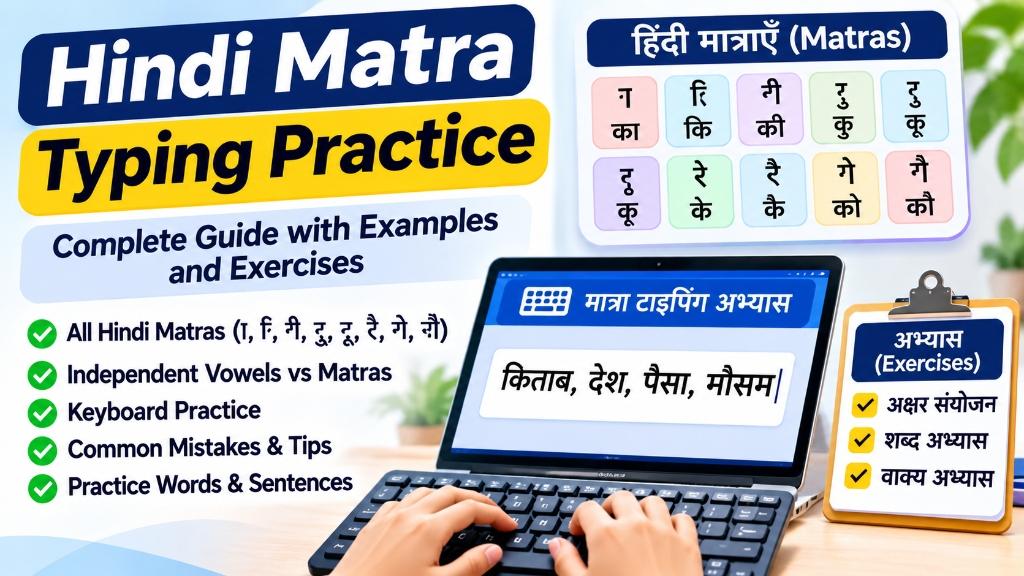
Hindi Matra Typing Practice: Complete Guide with Examples and Exercises
Master all Hindi matras (मात्राएँ) with our comprehensive typing guide. Includes complete vowel charts, consonant combinations, independent vs dependent vowels, common mistakes, and step-by-step practice exercises.
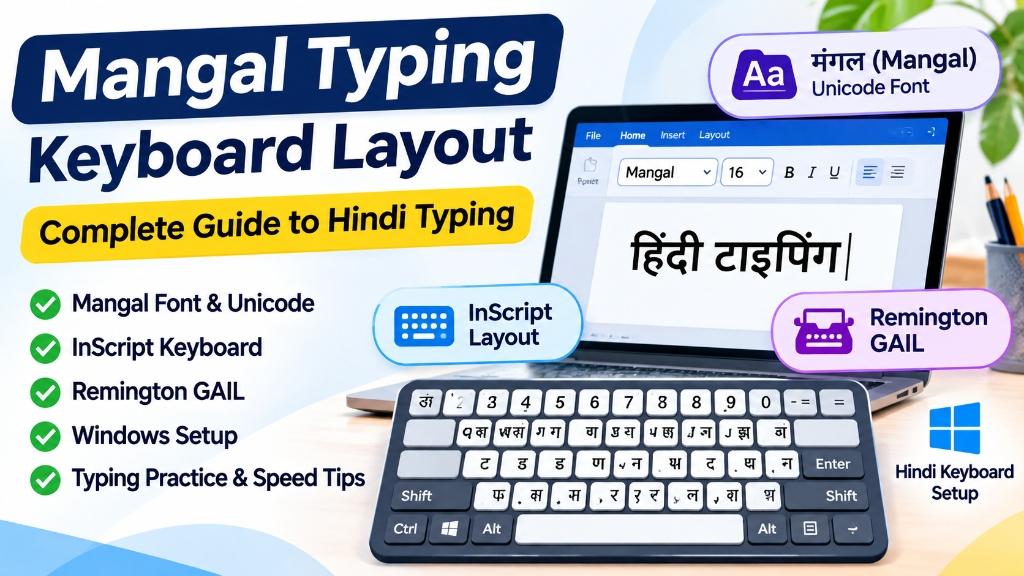
Mangal Typing Keyboard Layout: Complete Guide to Hindi Typing, InScript and Remington GAIL
Complete guide to Mangal typing, Hindi Unicode fonts, InScript and Remington GAIL keyboard layouts, Windows 11 setup, and government exam preparation.

IIEST Shibpur Recruitment 2026: Apply Online for 12 Superintendent, Personal Assistant and Senior Assistant Posts
IIEST Shibpur has invited online applications for 12 non-teaching positions including Superintendent, Personal Assistant and Senior Assistant under Advt Nos. RO/NO/26/35 and RO/NO/26/34. Apply via SAMARTH portal by 9 Dec 2026 and submit Google Form with PDF by 14 Dec 2026.

National Library LIS Intern Recruitment 2026: Apply Online for 25 Posts, ₹25,000 Monthly Stipend
The National Library, Ministry of Culture, Government of India has invited online applications for 25 LIS Intern positions across 23 Indian languages with a monthly stipend of ₹25,000 under Notice No. ADM/S-I(40)/Intern.26-27/5143. Check language-wise posts, eligibility & selection process.